file.exists("Cairns_Mangroves_30m.tif")
file.exists("SST_feb_2013.img")
file.exists("SST_feb_mean.img")12 Raster
12.1 The Basics of Rasters
This tutorial is focused on introducing the basics of what a raster is, and then how to get raster data into R and do some basic manipulation. If you just need to make a pretty site location map, or something similar, then you might be best starting with the Simple maps chapter.
12.1.1 Let’s get set up first
Download the data files needed for this tutorial: Cairns_Mangroves_30m.tif, SST_feb_2013.img, SST_feb_mean.img, Landsat_TIR.tif, and multiband.tif. Place them in your working directory, then check if you can see the data we’ll be using (your working directory should be this file’s location)
Install the packages we’re going to need - the raster package is the key library for raster objects in R, dismo has some nice wrappers for various sampling functions (plus some other neat SDM related stuff). (Older versions of this tutorial also used rgdal for reading spatial file formats; it was retired from CRAN in 2023, and raster now does this itself through the terra package.)
install.packages(c("raster", "dismo"))Check that you can load them
12.1.2 What is a raster?
Now we’re ready to go, but firstly, what is a raster? Well, simply, it is a grid of coordinates for which we can define certain values across, and we display the corresponding grid elements according to those values. The raster data is essentially a matrix, but a raster is special in that we define what shape and how big each grid element is, and usually where the grid should sit in some known space (i.e. a geographic projected coordinate system).
12.1.3 Understanding Raster Data
Make a raster object, and query it
dummy_raster <- raster(ncol = 10, nrow = 10) # let's make a small raster
nrow(dummy_raster) # number of pixels
ncol(dummy_raster) # number of pixels
ncell(dummy_raster) # total number of pixels
plot(dummy_raster) # doesn't plot because the raster is empty
hasValues(dummy_raster) # can check whether your raster has data
values(dummy_raster) <- 1 # give the raster a pixel value - in this case 1
plot(dummy_raster) # entire raster has a pixel value of 1
Make a random number raster so we can see what’s happening a little easier
values(dummy_raster) <- runif(ncell(dummy_raster)) # each pixel is assigned a random number
plot(dummy_raster) # raster now has pixels with random numbers
values(dummy_raster) <- runif(ncell(dummy_raster))
plot(dummy_raster)
dummy_raster[1, 1] # we can query rasters (and subset the maxtrix values) using standard R indexing
dummy_raster[1, ]
dummy_raster[, 1]
Use this to interactively query the raster - press esc to exit
click(dummy_raster)What’s special about a raster object?
str(dummy_raster) # note the CRS and extent, plus plenty of other slots
crs(dummy_raster) # check what coordinate system it is in, the default in the PROJ.4 format
xmax(dummy_raster) # check extent
xmin(dummy_raster)
ymax(dummy_raster)
ymin(dummy_raster)
extent(dummy_raster) # easier to use extent
res(dummy_raster) # resolution
xres(dummy_raster) # just pixel width
yres(dummy_raster) # just pixel height
12.1.3.1 Excercises
- make a raster with a smiley face (tip: make a blank raster, then use indexing to change values sequentially)
- extract some vector and matrix data from the raster (tip: use indexing or things like
?as.matrix) - subset the raster into a smaller chunk (tricker - see
?crop)
12.1.4 Working with real raster data
Import the Cairns mangrove data and have a look at it
mangrove <- raster("Cairns_Mangroves_30m.tif")
crs(mangrove) # get projection
plot(mangrove, col = topo.colors("2")) # note two pixel values, 0 (not mangrove) and 1 (mangrove)
NAvalue(mangrove) <- 0 # make a single binary dataset with mangroves having a raster value 1
plot(mangrove, col = "mediumseagreen")
The legend is a little odd - we can change to a categorical legend by doign this - but we’ll stick to the default continous bar generally so as to reduce clutter in the code
Simple processing
agg_mangrove <- aggregate(mangrove, fact = 10) # aggregate/resample cells (10 times bigger)

par(mfrow = c(2, 2))
plot(mangrove, col = "mediumseagreen")
plot(agg_mangrove, col = "firebrick")
plot(agg_mangrove, col = "firebrick")
plot(mangrove, col = "mediumseagreen", add = TRUE) # add information to current plot
Create a simple buffer
Note at this point, we could mess around with the margins if we cared about that, e.g. par(mar = c(2,1,2,1), oma = c(2,1,2,1)).
Convert raster to point data, and then import point data as raster
pts_mangrove <- rasterToPoints(mangrove)
str(pts_mangrove)

par(mfrow = c(2, 2))
plot(mangrove)
plot(rasterFromXYZ(pts_mangrove)) # huh?

NAvalue(mangrove) <- -999
pts_mangrove <- rasterToPoints(mangrove)
plot(rasterFromXYZ(pts_mangrove))

NAvalue(mangrove) <- 0 # set it back to 0
dev.off()
Export your data - lets try the aggregated raster
KML(agg_mangrove, "agg_mangrove.kml", overwrite = TRUE)
writeRaster(agg_mangrove, "agg_mangrove.tif", format = "GTiff")
Now, what about multiband rasters? The raster package handles them in the same way, just the nbands() attribute is >1 - think about an array instead of a matrix
What about making our own multiband raster?
for (i in 1:4) {
  assign(x = paste0("band", i), value = raster(ncol = 10, nrow = 10))
}
values(band1) <- runif(100)
values(band2) <- runif(100)
values(band3) <- runif(100)
values(band4) <- runif(100)
multiband_stack <- stack(list(band1, band2, band3, band4))
nlayers(multiband_stack)
plot(multiband_stack)
Plotting an RGB image?
Other handy processing functions
?crop
?merge
?trim
?interpolate
?reclassify
?rasterToPolygons
Some handy analysis functions
?zonal # zonal statistics
?focal # moving windows
?calc # raster calculator
?distance # distance calculations
?sampleRandom
?sampleRegular
?sampleStratified
We won’t go into detail on coordinate and projection systems today, but very briefly, CRS() and crs() are they key functions/objects
crs(mangrove)
proj4string(mangrove)

latlong <- "+init=epsg:4326"
CRS(latlong)
eastnorth <- "+init=epsg:3857"
CRS(eastnorth)

latlongs_mangrove <- rasterToPoints(mangrove, spatial = T)
latlongs_mangrove
projected_pts_mangrove <- spTransform(latlongs_mangrove, CRS(eastnorth))
projected_pts_mangrove
12.1.4.1 Excercises
- import the raster “Landsat_TIR.tif” - it’s a TIR (thermal infrared) image from the Landsat 8 satellite captured over a cropping area
- suppose we modelled the TIR values via linear regression to calculate the real on ground temperature, and beta0 was 0.5 and beta1 was 0.1 (i.e. y = 0.1x + 0.5) - make a map of temperature (hint:
?calc, and you’ll need to write a function) - give the plot a title and axis labels, and colours that make sense for temperature
- make a matching raster (in extent and number of pixels, for the easiest solution) with zone codes (for each pixel), then calulate the mean/sd temperature in those zones (hint:
?valuesand?zonal)
12.1.5 Extending raster analyses
Now let’s take a bit of a whirlwind tour of the types of analyses we can do, and hopefully discover a bit deeper understanding of raster analysis in R.
Load up some SST data - Feb 2013 for the globe (as an aside, check this link for more great ocean global data sets:
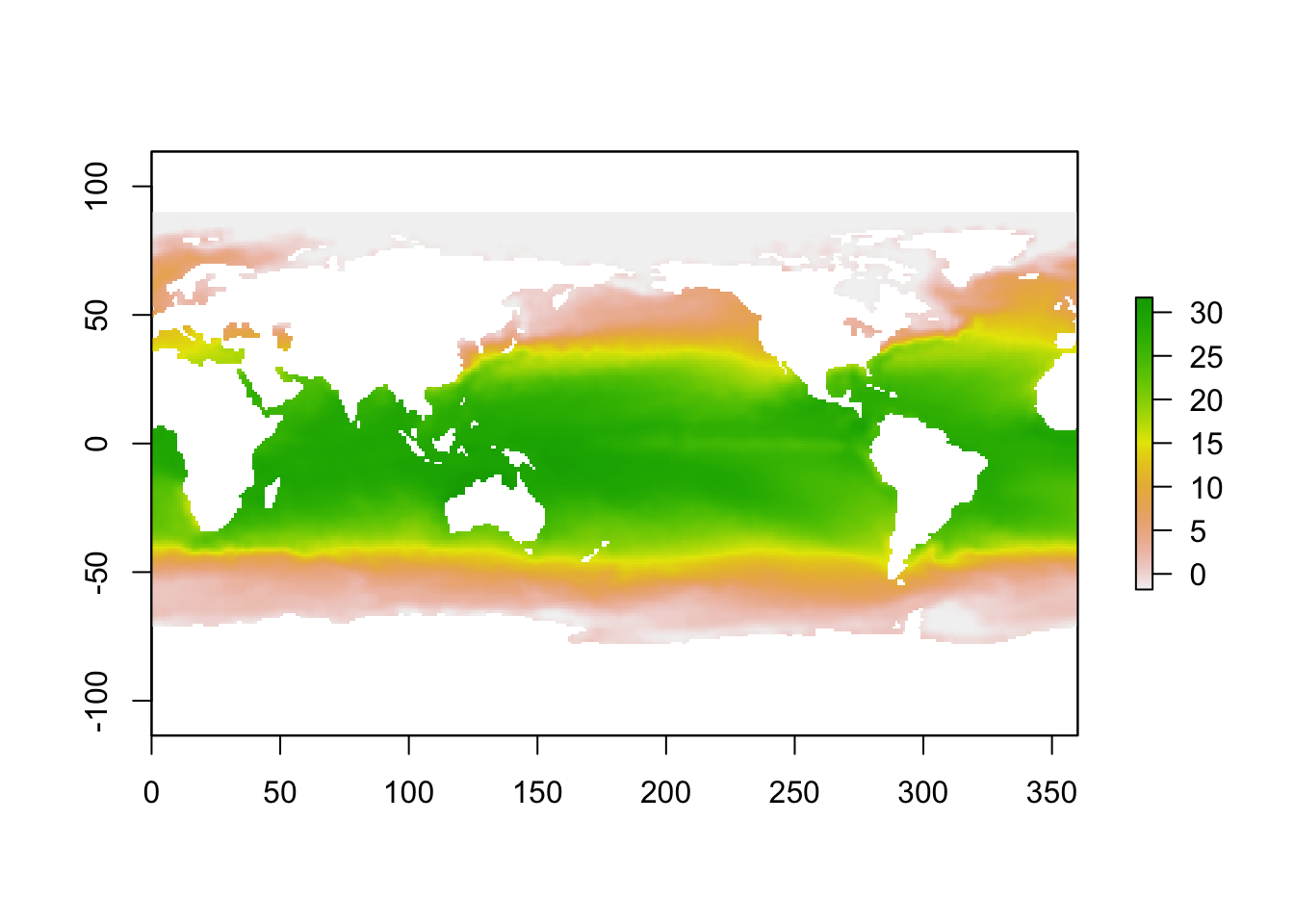
Crop it to the pacific so we can compare our mangrove data
Load up the long term mean SST data for Feb
Now let’s make an SST anomoly map
sst_anomaly <- sst_feb_crop - sst_mn_crop # R + {raster} matrix arithmatic
plot(sst_anomaly) # plot the anomaly map
plot(sst_anomaly, col = rev(heat.colors("100"))) # heat colours
contour(sst_anomaly, add = T) # add contours
Query single values,
or plots/stats for the entire image,
or let’s be a litle more tricky!
max_anom <- which.max(sst_anomaly)
max_xy <- xyFromCell(sst_anomaly, max_anom)
plot(sst_anomaly,
  col = rev(heat.colors("100")),
  main = "2013 Feb SST anomaly + hottest point"
)
points(max_xy, pch = 8, cex = 2)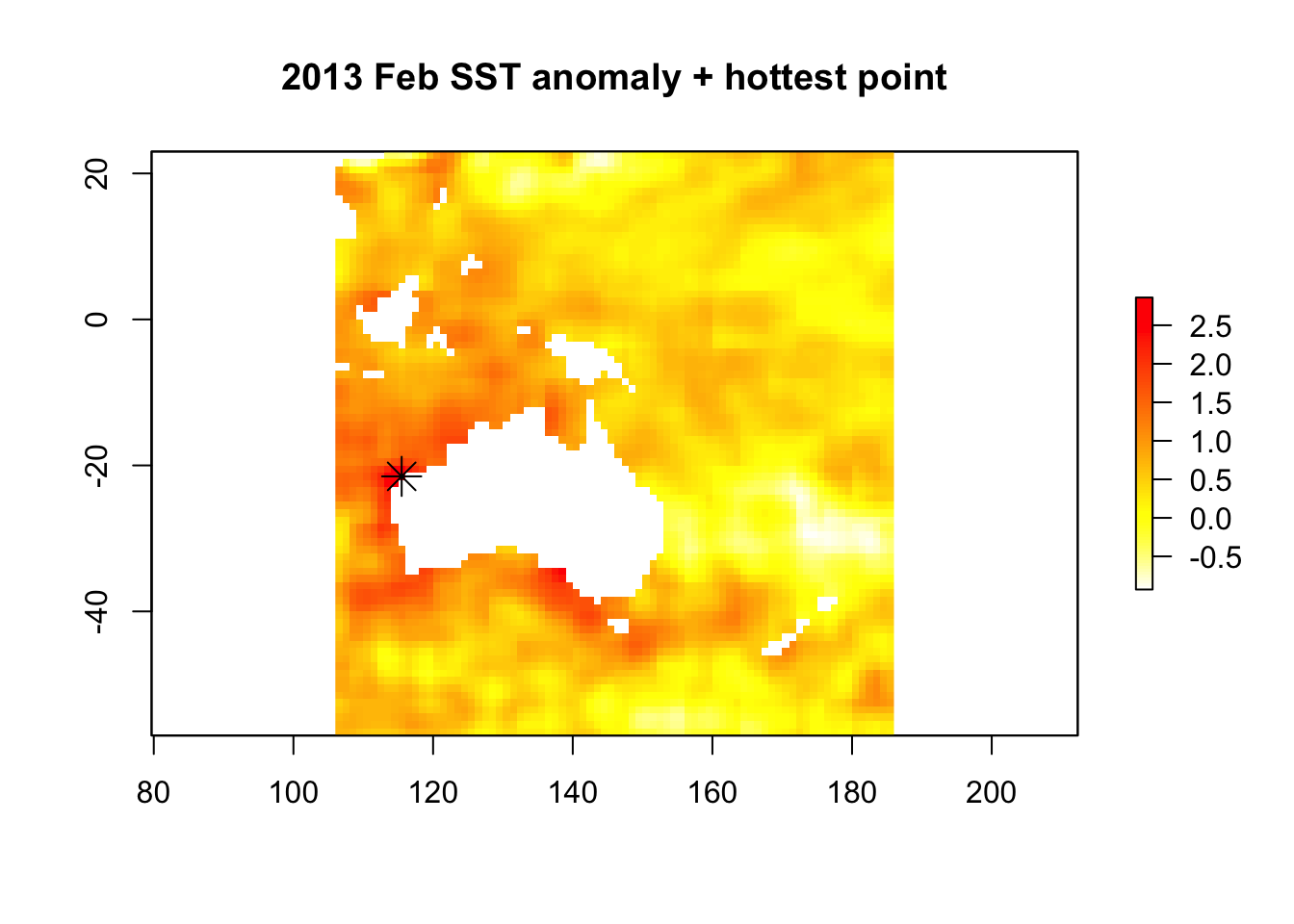
Sampling points conditionally? Sure. We’ll see a better wrapper for this further down though.
xy <- xyFromCell(sst_anomaly, sample(1:ncell(sst_anomaly), 20)) # 20 random points
points(xy)
extract(sst_feb, xy)
Try out ?getValues too. OK, re-capping writing back to disk
# writing rasters
writeRaster(sst_anomaly, "sst_anomaly.tif", format = "GTiff")
KML(sst_anomaly, "sst_anomaly.kml")
save(sst_anomaly, file = "sst_anomaly_feb.RData")
save(sst_feb_mn, file = "sst_feb_mn.RData") # check the file size, huh?
What’s going on with those last two save() commands? Something else to understand about the way the raster package handles raster files is that for larger rasters, the whole file is not stored in memory, rather it is just a pointer to the file. You can test whether or not it is
We saw stack() earlier, and we can use it for multi-band imagery, but also to stack up different information sources. brick() works in the same way, except that RasterBrick objects are designed for smaller data, and a RasterBrick can only point to one file, opposed to a RasterStack objects, which can point to multiple files.
So we can see why that might be useful for various remote sensing and modelling applicaitons.
12.1.6 Modelling and interpolation
Now let’s look at quick example of what we can do with rasters in context of species distribution modelling and spatial modelling. First lets extract some random points - make sure you’ve run library(dismo)
rpoints_sst <- randomPoints(sst_stack, 500) # ?randomPoints for more options
plot(sst_stack, 2)
points(rpoints_sst, pch = 16, cex = 0.7)
sst_samp <- extract(sst_stack, rpoints_sst) # extract values through stack this time
str(sst_samp)
sst_samp <- data.frame(sst_samp,
  lat = rpoints_sst[, 2], lon = rpoints_sst[, 1]
)
plot(sst_samp$SST_anomaly ~ sst_samp$SST_feb_2013)
# abline(lm(sst_samp$SST_anomaly ~ sst_samp$SST_feb_2013))
# plot(mgcv::gam(sst_samp$SST_anomaly ~ s(sst_samp$SST_feb_2013)), resid = T)
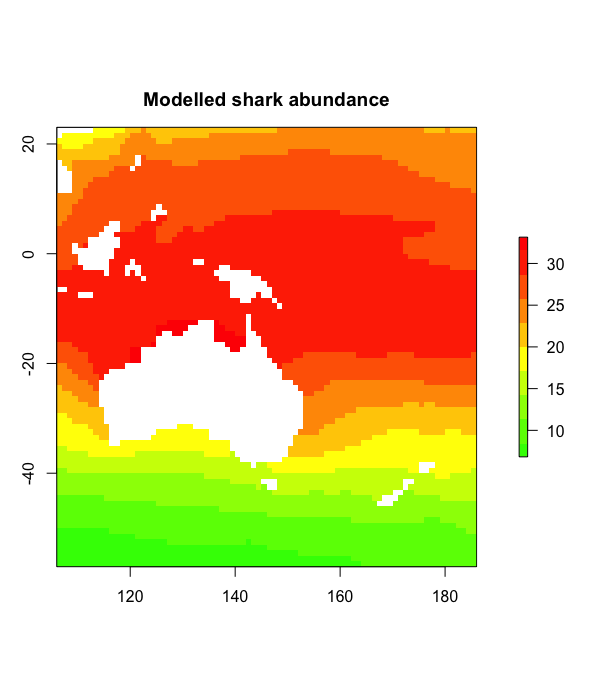
What if we had some real biological data at those points? Well, let’s make some up, and then fit a model to it
We would usually use predict() on a model fit object, and we can use it similarly for predicting out to raster data
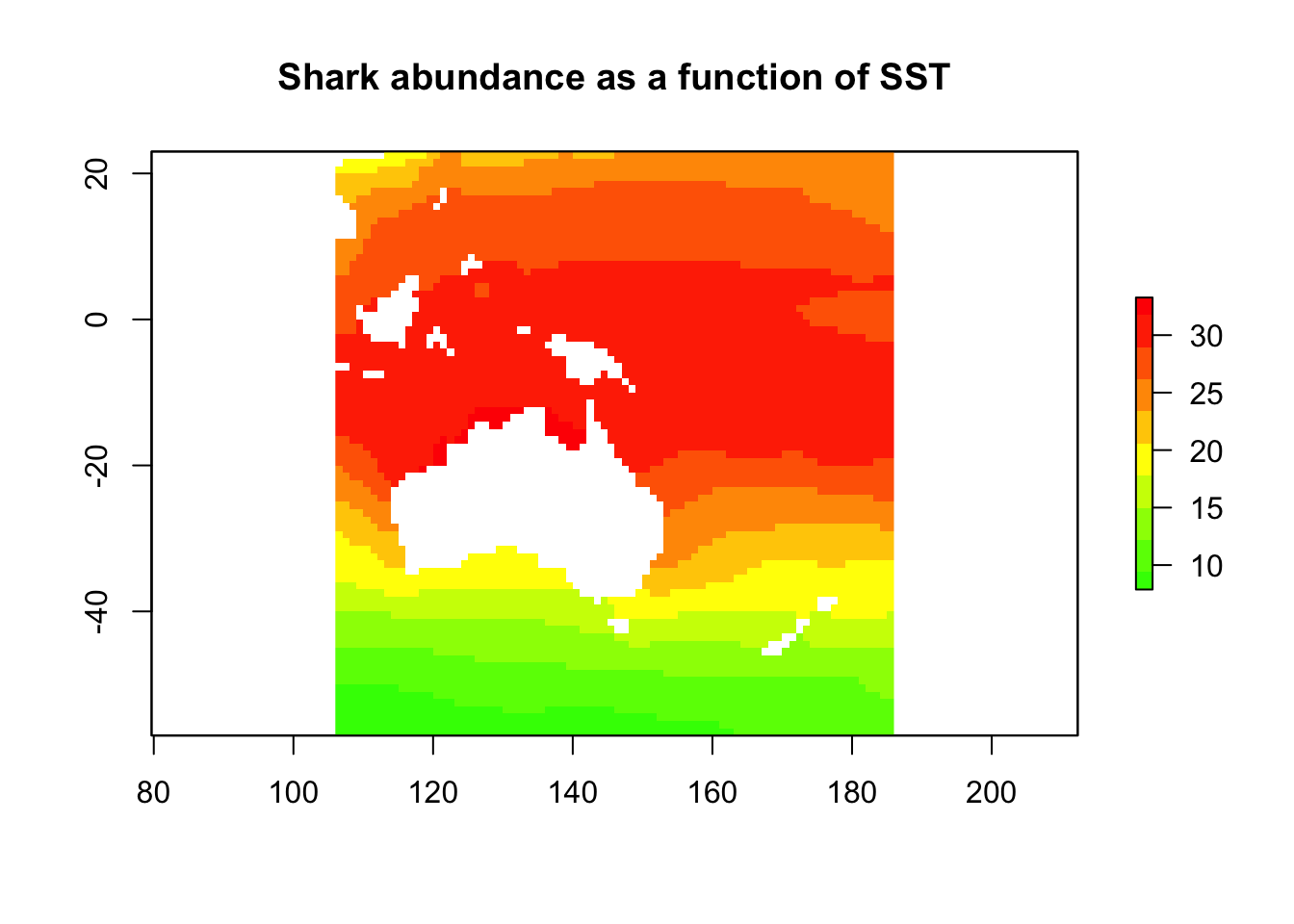
Let’s try somethign else, say attack risk. It’s not just about abdundance, something else like how mean or aggressive they are?
sst_samp$shark_aggression <- sst_samp$lat * -1 # so agression goes up with lattitude
sst_samp$shark_attack <- scale(sst_samp$shark_abund * sst_samp$shark_aggression)
attack_lm <- lm(shark_attack ~ SST_feb_2013 + SST_anomaly,
  data = sst_samp
)
shark_attack <- predict(sst_stack, attack_lm, type = "response")
plot(shark_attack,
  col = rev(rainbow(n = 10, start = 0, end = 0.3)),
  main = "Shark attack index!"
)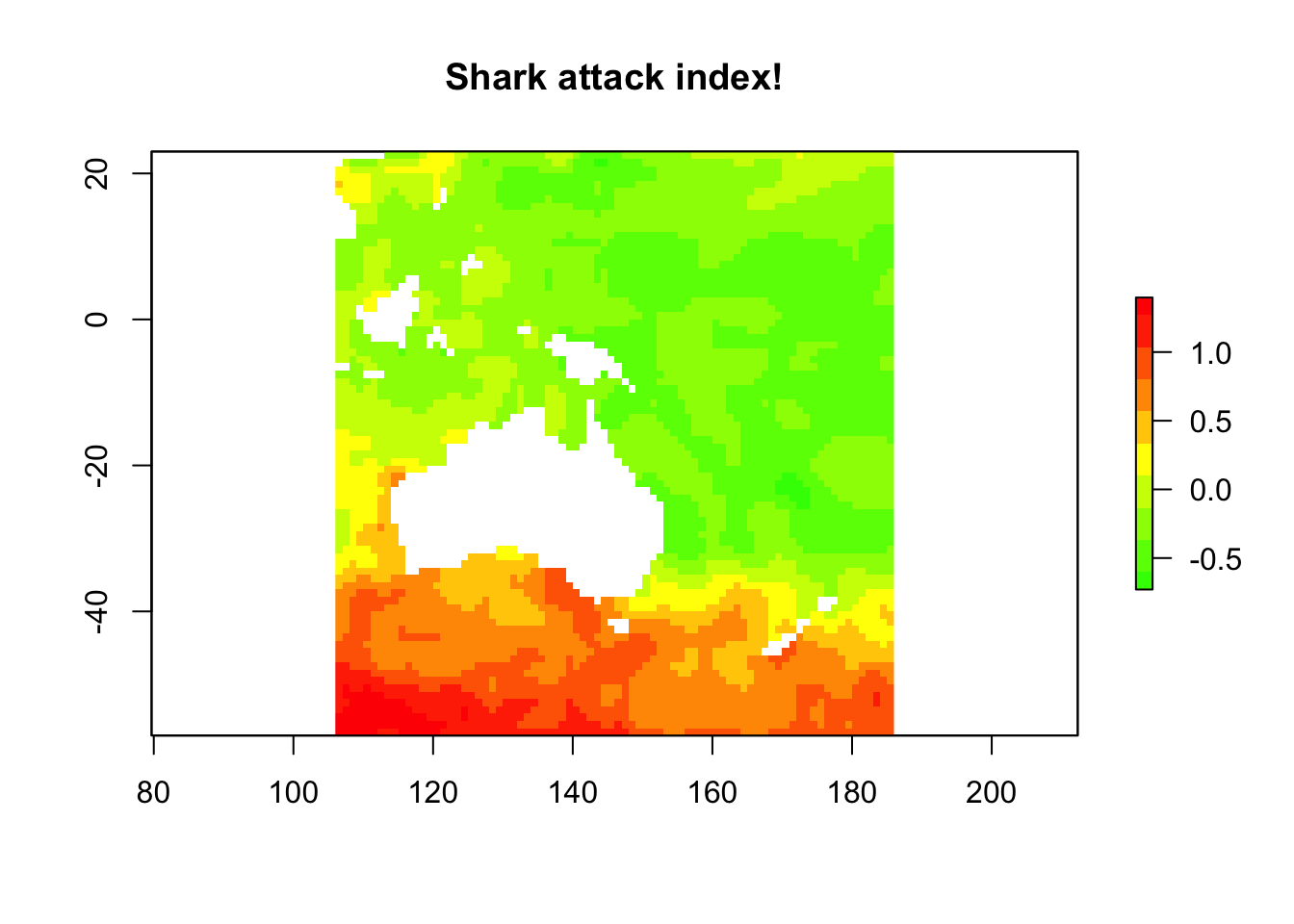
This is a quick and silly example. If we were less lazy, we might create a new image stack with the abundance predicitons and the lattitude values, pull the random samples out again, and re-fit the model and predictions.
12.1.6.1 Excercises
- try generating some stats (values or plots) for SST anomaly for different regions, either across the globe or across Australia
- try some band math, or some conditional statements using multiple rasters or a RasterStack
- create another SDM scenario - either using downloaded data, or totally simulated data
- if we just had the physical data at some points, and wanted to make those into a geographically weighted or interpolated SST map? You could sample some of the points then use
library(gstat)to try an IDW (inverse distance weighted) interpolation. Do some interpolations, varying the number of points used, and see how that effects your interpollated product
12.1.7 Some more stuff to investigate
Some of the other commonly used packages for spatial data analysis
You could also try getting bioclim climate data using the getData() function from the raster package, or getting various types of maps using the gmap() function from the dismo package or the map function from the maps package. If you go to the github page for this tutorial, you’ll find some answers to the excercies, plus some extra goodies realting to the above suggestions too.
Author: Mitchell Lyons
Year: 2017