24 Mixed Effects Models
Mixed models are those with a mixture of fixed and random effects. Random effects are categorical factors where the levels have been selected from many possible levels and the investigator would like to make inferences beyond just the levels chosen. Tricky concept, but imagine contrasting two habitat types (forest and grassland) by sampling five sites within each, and five replicate measures within each site. Habitat type is a fixed factor with the researcher only interested in those two levels of habitat type. If the five sites were chosen from a larger collection of possible sites, then site is considered a random effect with 10 levels.
-
Mixed models 1: Linear mixed models with one random effect
-
Mixed models 2: Linear mixed models with several random effects
- Mixed models 3: Generalised linear mixed models
 Photo: N. Murray
24.1 Linear mixed models with one random effect
Linear mixed models with one random effect
You will need to use mixed effect models if you have a random factor in your experimental design. A random factor
- is categorical
- has a large number of levels
- only a random subsample of levels is included in your design
- you want to make inference in general, and not only for the levels you observed.
This is a tough concept to get your head around, and is best explained with an example. The data we will analyse here are counts of invertebrates at 3-4 sites in each of 7 (randomly chosen) estuaries. Here the estuaries are the random effect, as there are a large number of possible estuaries, and we only sample from a random few of them, but we would like to make inference about estuaries in general.

We will introduce mixed models in three parts
Mixed models 1 (this section) is an introduction to mixed models for a continuous response with one random effect. You will learn how to check assumptions and do inference, including the parametric bootstrap.
Mixed models 2 extends this to multiple random effects with a continuous response. We look into how to model nested and crossed random effects.
Mixed models 3 teaches you how to model discrete data, including counts and binary data, with random effects.
All three sections will use the same data for illustration.
Properties of mixed models
Assumptions. Mixed models make some important assumptions (we’ll check these later for our examples)
- The observed \(y\) are independent, conditional on some predictors \(x\)
- The response \(y\) are normally distributed conditional on some predictors \(x\)
- The response \(y\) has constant variance, conditional on some predictors \(x\)
- There is a straight line relationship between \(y\) and the predictors \(x\) and random effects \(z\)
- Random effects \(z\) are independent of \(y\).
- Random effects \(z\) are normally distributed
24.1.1 Running the analysis
We will use the package lme4 for all our mixed effect modelling. It will allow us to model both continuous and discrete data with one or more random effects. First, install and load this package:
We will analyse a data set that aimed to test the effect of water pollution on the abundance of some subtidal marine invertebrates by comparing samples from modified and pristine estuaries. As the total counts are large, we will assume the data is continuous. Later on in Mixed models 3, we’ll model counts as discrete using Generalised linear mixed models (GLMMs).
Download the sample data set, Estuaries.csv, and load into R.
Estuaries <- read.csv("data/Estuaries.csv", header = T)Fitting a model with a fixed and random effect
In this data set, we have a fixed effect (Modification; modified vs pristine) and a random effect (Estuary). We can use the lmer function to fit a model for any dependent variables with a continuous distribution. To fit a model for total abundance, we would use:
ft.estu <- lmer(Total ~ Modification + (1 | Estuary), data = Estuaries, REML = T)where Total is the dependent variable (left of the ~), Modification is the fixed effect, and Estuary is the random effect.
Note the syntax for one random effect is (1|Estuary) - this is fitting a different intercept (hence 1) for each Estuary.
This model can be fit by maximum likelihood (REML=F) or restricted maximum likelihood (REML=T). For fitting models it’s best to use REML, as it is less biased (unbiased for balanced samples), particularly in small samples. However to use the anova function below we need to refit with maximum likelihood.
24.1.2 Assumptions to check
Before we look at the results of our analysis, it’s important to check that our data met the assumptions of the model we used. Let’s look at all the assumptions in order.
Assumption 1: The observed \(y\) are independent, conditional on some fixed effects \(x\) and random effects \(z\)
We can’t check this assumption, but you can ensure it’s true by taking a random sample within each level of the random effect in your experimental design.
Assumption 2: The response \(y\) are normally distributed conditional on some predictors \(x\) and random effects \(z\)
This assumption is only critical when we have a small sample size or very skewed data. We can check it with a normal quantile plot of residuals.
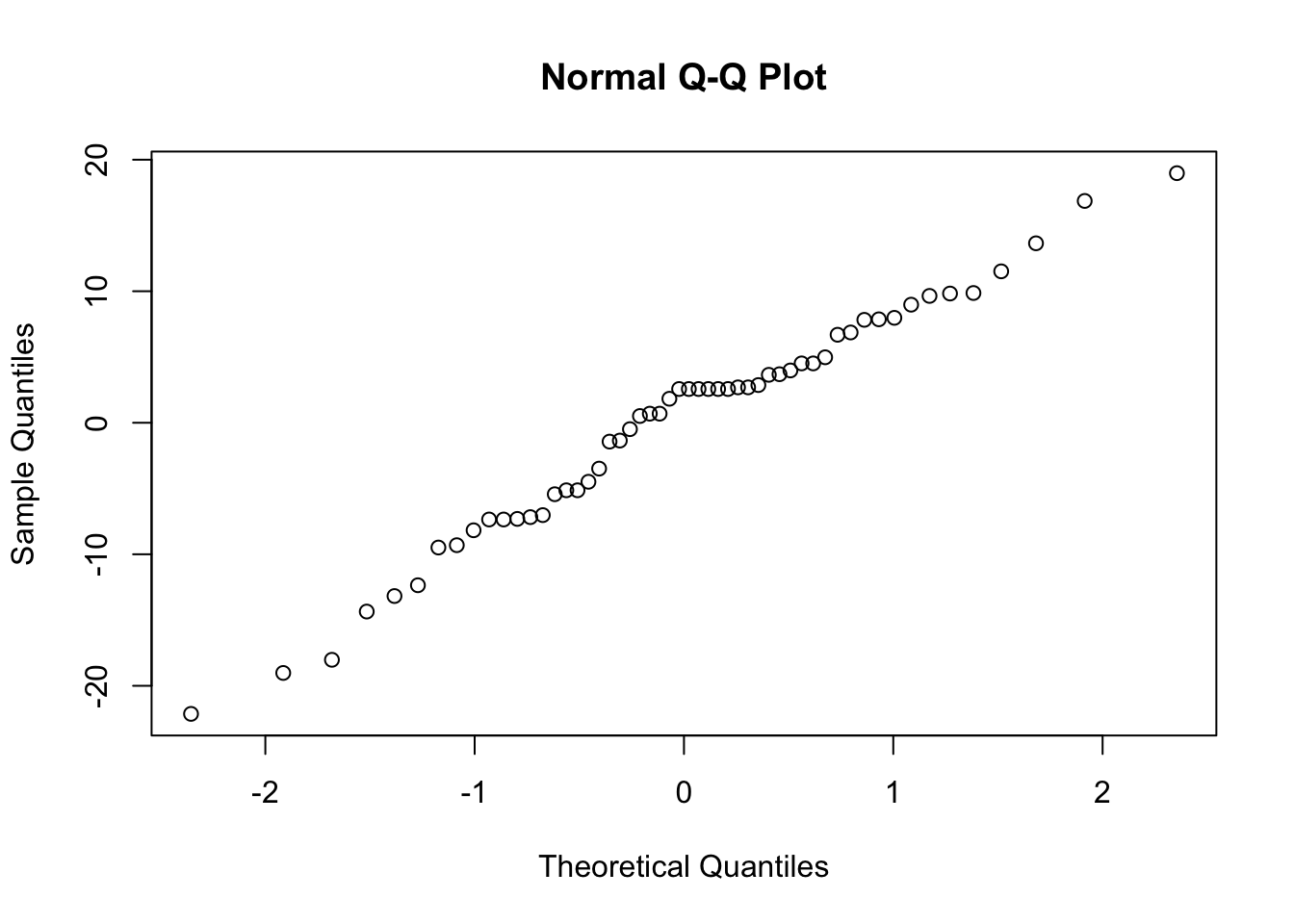
We are looking for a straight line relationship. Here, the assumption of normality seems reasonable.
Assumption 3: The response \(y\) has constant variance, conditional on some fixed effects \(x\) and random effects \(z\)
Like a linear model, a mixed model assumes constant variance. We can check this by looking for a fan shape in the residual plot (residuals vs fitted values).
scatter.smooth(residuals(ft.estu) ~ fitted(ft.estu))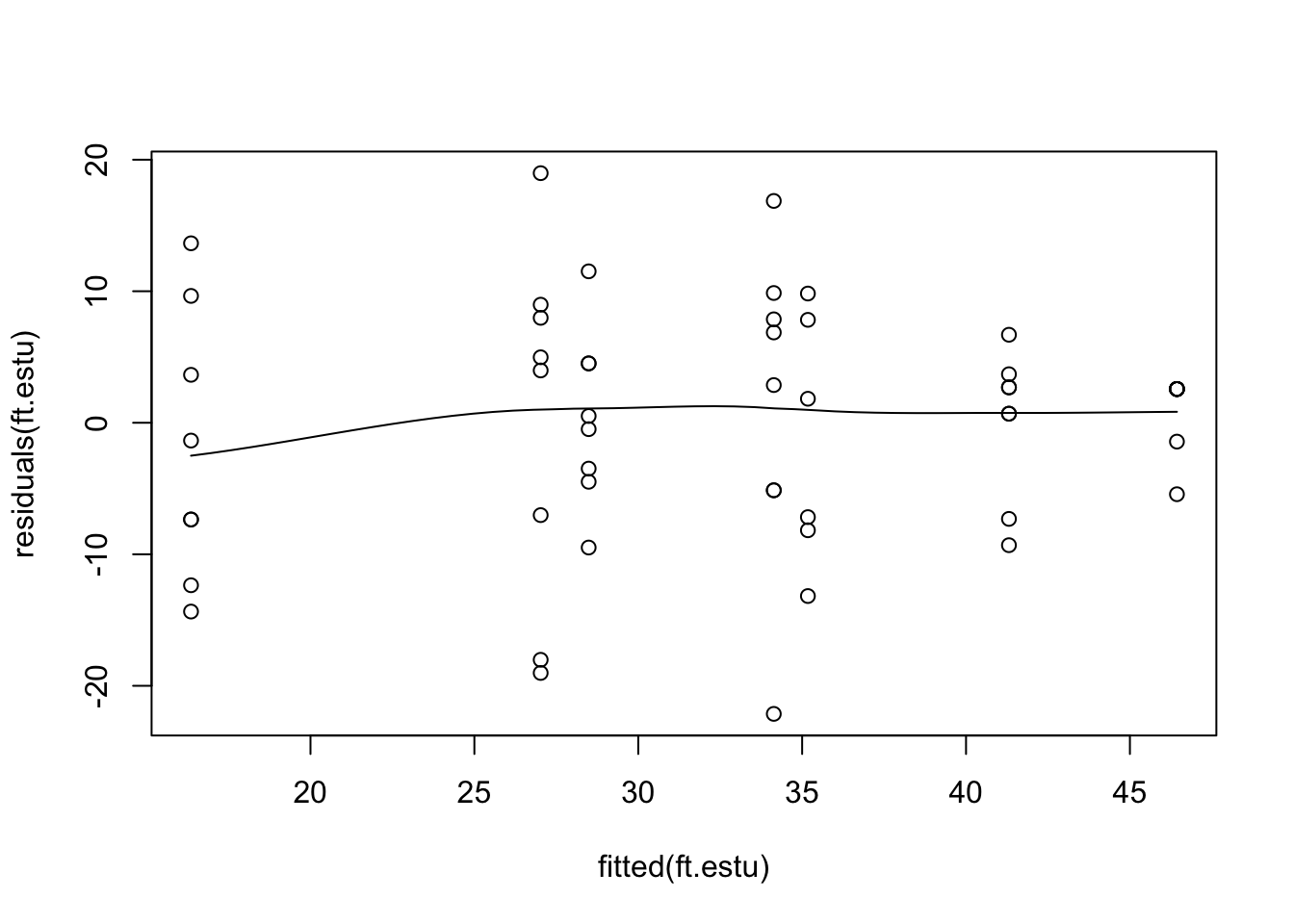
This residual plot seems reasonable, there are differences in variability between estuaries, but variability does not increase with the mean. Note, that the function scatter.smooth is just a scatter plot with a fitted, smoothed curve.
Assumption 4: There is a straight line relationship between \(y\) and the predictors \(x\) and random effects \(z\)
To check this assumption, we check the residual plot again for non-linearity, or a U-shape. In our case there is no evidence of non-linearity. If the residuals seem to go down then up, or up then down, we may need to add a polynomial function of the predictors using the poly function.
Assumption 5: Random effects \(z\) are independent of \(y\).
We can’t check this assumption, but you can ensure it’s true by taking a random sample of estuaries.
Assumption 6: Random effects \(z\) are normally distributed.
This assumption is not crucial (and difficult) to check.
24.1.3 Interpreting the results
Hypothesis test for the fixed effect
The package lme4 won’t give you p-values for fixed effects as part of the output in summary. This is because the p-values from Wald tests (using summary) and likelihood ratio tests (using anova) are only approximate in mixed models.
Nevertheless, we will use the anova function to test for an effect of modification on the total abundance of invertebrates, taking into account the random effect of estuary.
First, we fit the full model by maximum likelihood, and a second model that lacks the fixed effect of Modification
Then, we compare these two models with a likelihood ratio test, using the anova function.
anova(ft.estu.0, ft.estu)Data: Estuaries
Models:
ft.estu.0: Total ~ (1 | Estuary)
ft.estu: Total ~ Modification + (1 | Estuary)
npar AIC BIC logLik -2*log(L) Chisq Df Pr(>Chisq)
ft.estu.0 3 415.02 420.99 -204.51 409.02
ft.estu 4 411.92 419.87 -201.96 403.92 5.1055 1 0.02385 *
---
Signif. codes: 0 '***' 0.001 '**' 0.01 '*' 0.05 '.' 0.1 ' ' 1We find that there is evidence of an effect of Modification (p = 0.02385).
We can also calculate confidence intervals for each model parameter using the confint function.
confint(ft.estu) 2.5 % 97.5 %
.sig01 2.718166 12.538348
.sigma 7.676352 11.522837
(Intercept) 31.918235 49.981321
ModificationPristine -26.360731 -2.538241This also provides evidence for an effect of Modification as this parameter (i.e., the difference between the modified and pristine estuaries) has 95% confidence intervals that do not overlap zero.
Hypothesis test for random effects
You can use the anova function to test for random effects, but the p-values are very approximate and we do not recommend this procedure. Instead we will use a parametric bootstrap. This is a simulation based method which involves a fair chunk of code, but there’s not much about the code you have to change for different models, it’s mostly just a matter of copy-paste.
Parametric bootstrap
nBoot <- 1000
lrStat <- rep(NA, nBoot)
ft.null <- lm(Total ~ Modification, data = Estuaries) # null model
ft.alt <- lmer(Total ~ Modification + (1 | Estuary), data = Estuaries, REML = F) # alternate model
lrObs <- 2 * logLik(ft.alt) - 2 * logLik(ft.null) # observed test stat
for (iBoot in 1:nBoot)
{
  Estuaries$TotalSim <- unlist(simulate(ft.null)) # resampled data
  bNull <- lm(TotalSim ~ Modification, data = Estuaries) # null model
  bAlt <- lmer(TotalSim ~ Modification + (1 | Estuary), data = Estuaries, REML = F) # alternate model
  lrStat[iBoot] <- 2 * logLik(bAlt) - 2 * logLik(bNull) # resampled test stat
}
mean(lrStat > lrObs) # P-value for test of Estuary effect
[1] 0.001There is strong evidence for including estuary in your model (p = 0.001). You could use similar code to test for the effect of Modification with a parametric bootstrap.
24.1.4 FAQ for mixed models
24.1.5 FAQ for mixed models
1. Do I need balanced samples to fit a mixed model?
No, unbalanced designs are fine. Balanced designs will generally give you better power though, so they are good to aim for.
2. Should I sample many levels of the random effect, or lots of observations within each level?
This depends on what you are interested in. In our example, we are interested in the effect of modification. In the study design, estuaries fall directly below modification, so we need a lot of estuaries within each level of Modification to make good inference about the effects of modification. This is true in general, you need lots of samples in the level below the level you are primarily interested in.
3. Does my random factor have to be a random effect?
Not necessarily. If you have a random factor (i.e., you have a random sample of categories from a categorical variable) and you want to make inferences about that variable in general, not just at the categories you observed, then include it as a random effect. If you are happy making inference about just the levels you observed, then you can include it as a fixed effect. In our example we wanted to make inference about modification in general, i.e. in every modified and unmodified estuary, so we included estuary as a random effect. If we had treated Estuary as a fixed factor, we would have been restricted to making conclusions about only the estuaries we sample.
4. What if the levels of my factor aren’t really random?
This might be a problem as assumption 4 may not hold. You should always sample the random effect randomly to avoid bias and incorrect conclusions.
24.1.6 Communicating the results
Written. Results of linear mixed models are communicated in a similar way to results for linear models. In your results section you should mention that you are using mixed models with R package lme4, and list your random and fixed effects. You should also mention how you carried out inference, i.e. likelihood ratio tests (using the anova function) or parametric bootstrap. In the results section for one predictor, it suffices to write one line, e.g. “There is strong evidence (p<0.001) of negative effect of modification on total abundance. For multiple predictors it’s best to display the results in a table.
Visual. The best way to visually communicate results will depend on your question, for a simple mixed model with one random effect, a plot of the raw data with the model means superimposed is one possibility. There is a little bit of code that is required for such a plot, and it will be a little different for your data and model.
ModEst <- unique(Estuaries[c("Estuary", "Modification")]) # find which Estuaries are modified

# Prepare a vector of colors with specific color by modification levels
myColors <- ifelse(unique(ModEst$Modification) == "Modified", rgb(0.1, 0.1, 0.7, 0.5),
  ifelse(unique(ModEst$Modification) == "Pristine", rgb(0.8, 0.1, 0.3, 0.6),
    "grey90"
  )
)

boxplot(Total ~ Estuary, data = Estuaries, col = myColors, xlab = "Estuary", ylab = "Total invertebrates")
legend("bottomleft",
  inset = .02,
  c(" Modified ", " Pristine "), fill = unique(myColors), horiz = TRUE, cex = 0.8
)

# 0 if Modified, 1 if Pristine
is.mod <- ifelse(unique(ModEst$Modification) == "Modified", 0,
  ifelse(unique(ModEst$Modification) == "Pristine", 1, NA)
)

Est.means <- coef(ft.estu)$Estuary[, 1] + coef(ft.estu)$Estuary[, 2] * is.mod # Model means
stripchart(Est.means ~ sort(unique(Estuary)), data = Estuaries, pch = 18, col = "red", vertical = TRUE, add = TRUE)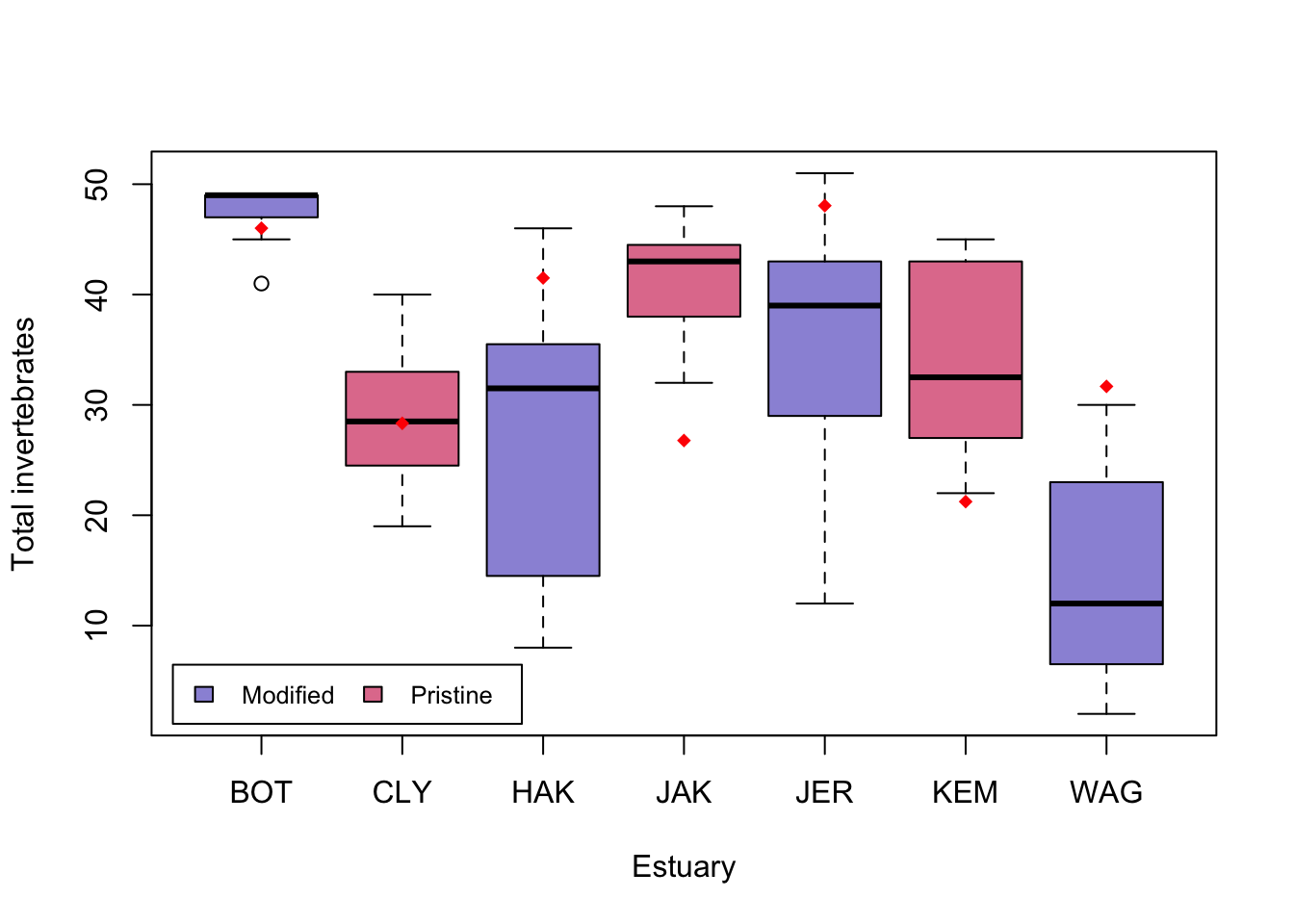
24.1.7 Further help
You can type ?lmer into R for help with these functions.
Fitting linear mixed-effects models using lme4 (Bates et al. 2015, Journal of Statistical Software), from the authors of lme4.
Faraway, JJ. Extending the linear model with R: generalized linear, mixed effects and nonparametric regression models. CRC press, 2005.
Zuur, A, EN Ieno and GM Smith. Analysing ecological data. Springer Science & Business Media, 2007.
Author: Gordana Popovic
Year: 2016
24.2 Crossed and Nested Factors
Mixed models 1 is an introduction to mixed models with one random factor. After reading that, if you think you have more than one random factor, then read on. For example, you might have crossed or nested factors.
Many experimental designs in ecology and environmental sciences require mixed models with several random effects (factors). You might have heard of nested and crossed factors. We often define these as quite distinct designs (e.g., from www.theanalysisfactor.com)
Two factors are crossed when every category (level) of one factor co-occurs in the design with every category of the other factor. In other words, there is at least one observation in every combination of categories for the two factors.
A factor is nested within another factor when each category of the first factor co-occurs with only one category of the other. In other words, an observation has to be within one category of Factor 2 in order to have a specific category of Factor 1. All combinations of categories are not represented.
There are also intermediate designs that are partially crossed, where some levels of one factor occur in several (but not all) levels of the second factor. These designs have often been taught as separate problems with different ways to carry out analyses of variance (ANOVAs) depending on if you have crossed or nested factors. Using mixed models with the package lme4, we can think if all of these in one framework, where nested and crossed designs are modelled in the same way. Thinking about factors as crossed or nested is simplified to careful labelling of factor levels - more on this later.
24.2.1 Running the analysis
We will use the package lme4 for all our mixed effect modelling. It will allow us to model both continuous and discrete data with one or more random effects. First, load the package:
We will analyse a data set that aimed to test the effect of water pollution on the abundance of some subtidal marine invertebrates by comparing samples from modified and pristine estuaries. As the total counts are large, we will assume the data are continuous. Later on, in Mixed models 3, we’ll model counts as discrete using Generalised linear mixed models (GLMMs).

Download the sample data set, Estuaries.csv, and load into R.
Estuaries <- read.csv("data/Estuaries.csv", header = T)Fitting a model with a fixed effect and several random effects
In this data set, we have a fixed effect (Modification; modified vs pristine) and two random effects (Estuary and Site). Site is nested within Estuary as each site can only belong in one estuary. When entering the data, however, we’ve been careless and numbered sites within each estuary as 1, 2, 3 etc.
We can see this by looking at the data, and a cross tabulation.
Estuaries[1:10, ] X Modification Estuary Site Hydroid Total Schizoporella.errata
1 1 Modified JAK 1 0 44 15
2 2 Modified JAK 1 0 42 8
3 3 Modified JAK 2 0 32 9
4 4 Modified JAK 2 0 44 14
5 5 Modified JAK 3 1 42 6
6 6 Modified JAK 3 1 48 12
7 7 Modified JAK 4 0 45 28
8 8 Modified JAK 4 0 34 1
9 9 Pristine JER 1 7 29 0
10 10 Pristine JER 1 5 51 0xtabs(~ Estuary + Site, Estuaries, sparse = TRUE)7 x 4 sparse Matrix of class "dgCMatrix"
Site
Estuary 1 2 3 4
BOT 2 2 2 2
CLY 2 2 2 2
HAK 2 2 2 2
JAK 2 2 2 2
JER 2 2 2 2
KEM 2 2 . 2
WAG 2 2 2 2Estuary JAK and estuary JER each have sites numbered 1, even though these sites are not connected in any way. We can also see this in the cross tabulation xtabs. This site labelling looks crossed, where each site occurs in each estuary, rather than nested.
We can fix this by simply telling R that Site is nested in Estuary. It is best practice, however, to do this at the data entry stage. If things are the same, then they should be labelled the same, and if they are not they should be labelled differently.
To create a unique label for each site in this data set, we convert Site to a factor (it was an integer), and create a new variable (SiteWithin) that is the combination of Estuary and Site
Now, check the structure to see that each site is nested in only one Estuary, consistent with the experimental design.
xtabs(~ Estuary + SiteWithin, Estuaries, sparse = TRUE)7 x 27 sparse Matrix of class "dgCMatrix" SiteWithin
Estuary
BOT 2 2 2 2 . . . . . . . . . . . . . . . . . . . . . . .
CLY . . . . 2 2 2 2 . . . . . . . . . . . . . . . . . . .
HAK . . . . . . . . 2 2 2 2 . . . . . . . . . . . . . . .
JAK . . . . . . . . . . . . 2 2 2 2 . . . . . . . . . . .
JER . . . . . . . . . . . . . . . . 2 2 2 2 . . . . . . .
KEM . . . . . . . . . . . . . . . . . . . . 2 2 2 . . . .
WAG . . . . . . . . . . . . . . . . . . . . . . . 2 2 2 2To fit a model for total abundance, we would use:
Linear mixed model fit by REML ['lmerMod']
Formula: Total ~ Modification + (1 | Estuary) + (1 | SiteWithin)
   Data: Estuaries

REML criterion at convergence: 386.6

Scaled residuals:
    Min      1Q  Median      3Q     Max
-1.8686 -0.6687  0.1504  0.6505  1.9816

Random effects:
 Groups     Name        Variance Std.Dev.
 SiteWithin (Intercept) 49.85    7.061
 Estuary    (Intercept) 47.59    6.899
 Residual               43.65    6.607
Number of obs: 54, groups:  SiteWithin, 27; Estuary, 7

Fixed effects:
                     Estimate Std. Error t value
(Intercept)            41.053      4.739   8.662
ModificationPristine  -14.553      6.232  -2.335

Correlation of Fixed Effects:
            (Intr)
MdfctnPrstn -0.760
where Total is the dependent variable (left of the ~), Modification is the fixed effect, and Estuary and SiteWithin are the random effects.
We’ll also fit the wrong model, to see the difference if we had used the old labels for each site.
Linear mixed model fit by REML ['lmerMod']
Formula: Total ~ Modification + (1 | Estuary) + (1 | Site)
   Data: Estuaries

REML criterion at convergence: 393.6

Scaled residuals:
    Min      1Q  Median      3Q     Max
-2.3312 -0.7631  0.1040  0.5766  1.8202

Random effects:
 Groups   Name        Variance Std.Dev.
 Estuary  (Intercept) 53.613   7.322
 Site     (Intercept)  7.686   2.772
 Residual             80.045   8.947
Number of obs: 54, groups:  Estuary, 7; Site, 4

Fixed effects:
                     Estimate Std. Error t value
(Intercept)            41.257      4.849   8.508
ModificationPristine  -14.757      6.124  -2.410

Correlation of Fixed Effects:
            (Intr)
MdfctnPrstn -0.727
The only place we can see an obvious difference is under the Random effects table. For the correct model we have Number of obs: 52, groups: SiteWithin, 26; Estuary, 7 while the wrong model tells us we have only 4 sites, which we know is incorrect.
Note: fit.wrong would be correct if we had crossed factors
24.2.2 Checking assumptions
The assumptions are the same as for one random factor, but it doesn’t hurt to list them again
- The observed \(y\) are independent, conditional on some predictors \(x\)
- The response \(y\) are normally distributed conditional on some predictors \(x\)
- The response \(y\) has constant variance, conditional on some predictors \(x\)
- There is a straight line relationship between \(y\) and the predictors \(x\) and random effects \(z\)
- Random effects \(z\) are independent of \(y\).
- Random effects \(z\) are normally distributed
See Mixed models 1 for detailed guidance about assumptions in linear mixed models. Briefly, assumptions 1 and 5 cannot be checked, but can be ensured by taking random samples, and assumption 6 is not crucial and difficult to check. To check assumption 2 we look for a straight line relationship on the normal quantile plot. To check assumptions 3, and 4 we look for a fan shape and U shape on the residual vs. fitted plot.
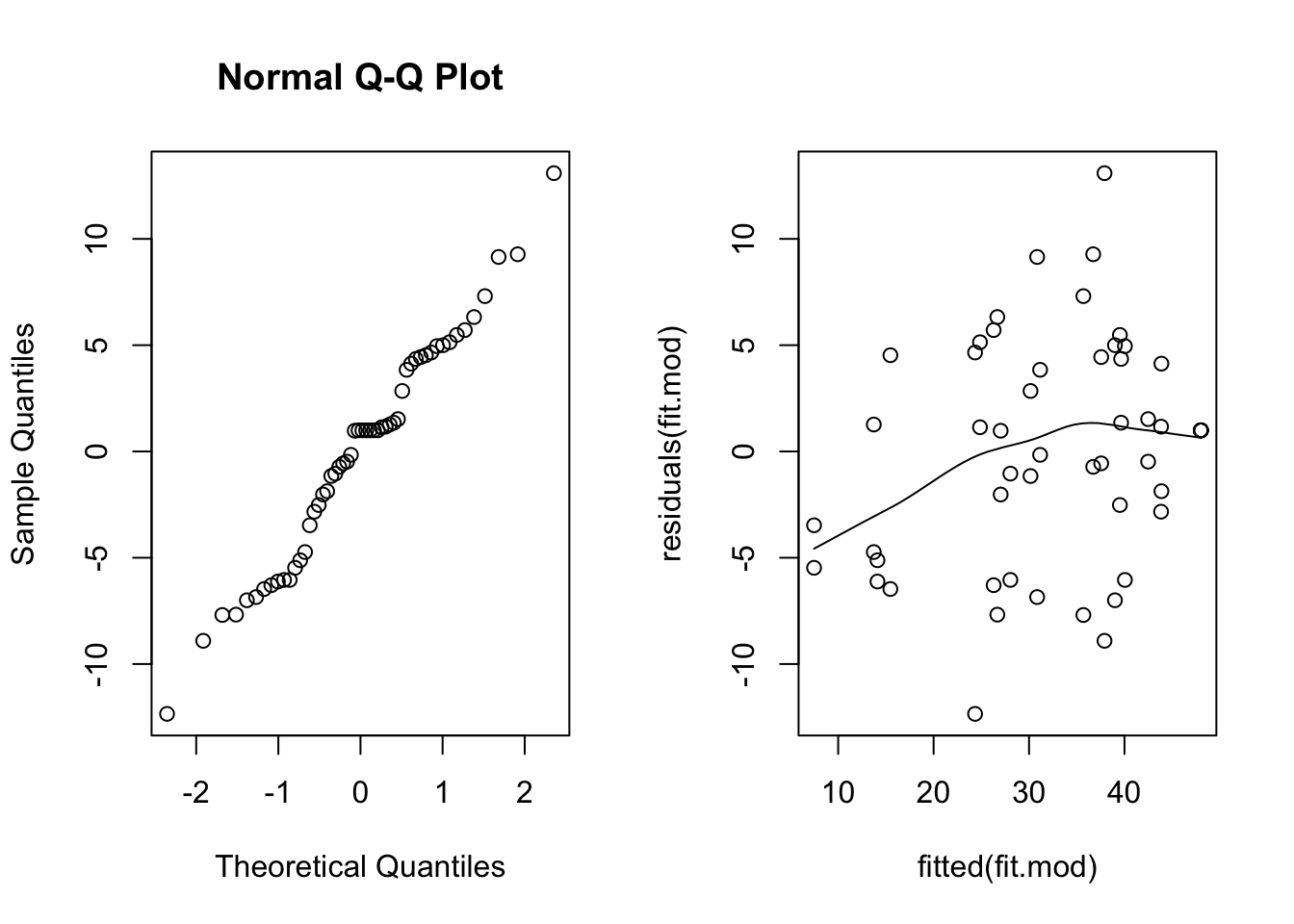
The normal quantile plot looks reasonable, however we see here a definite fan shape in the residual vs. fit plot. Let’s try transforming the response and see if we do better.
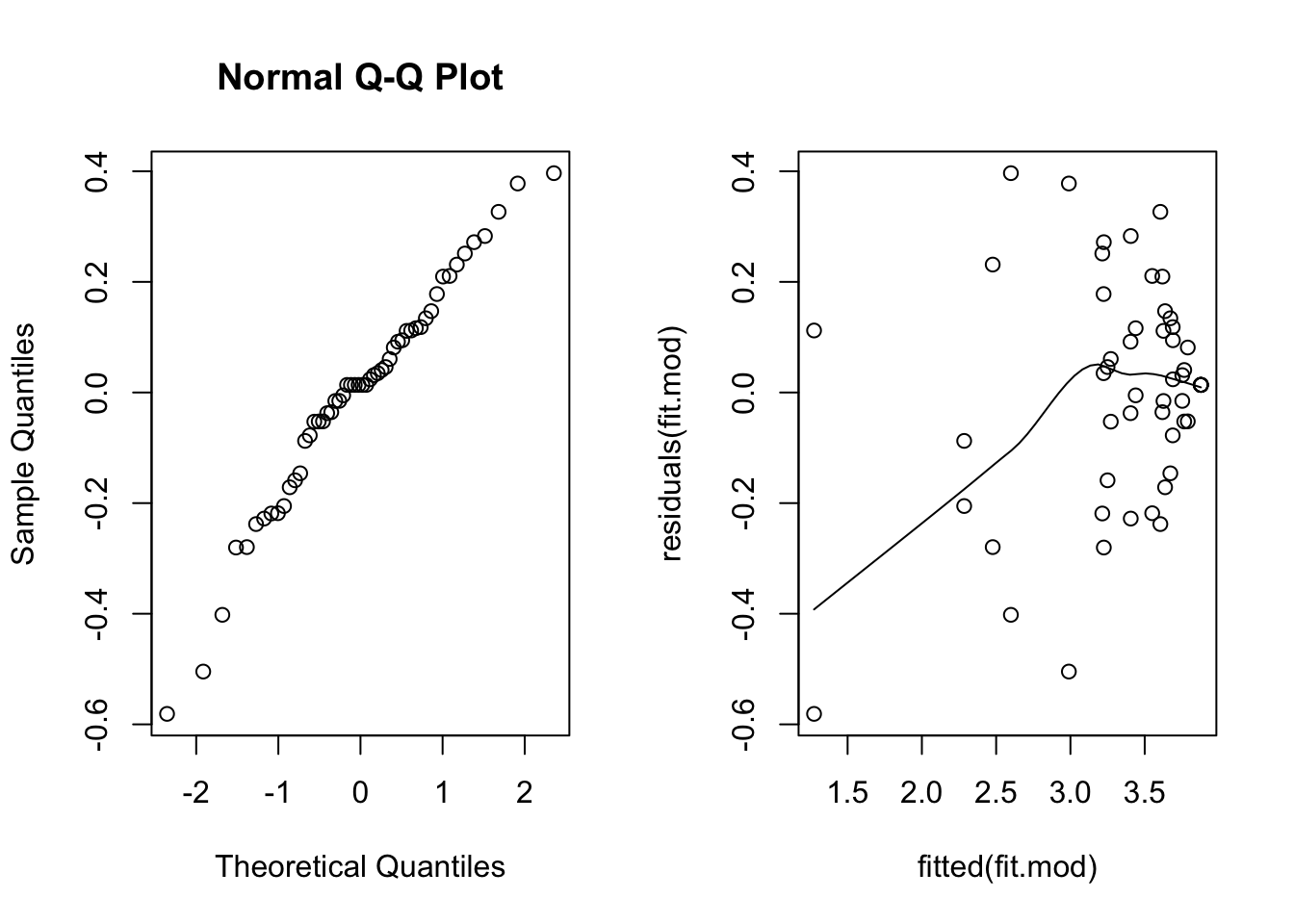
This scatterplot is much better, the fan shape is all but gone. The smooth line is below zero on the left, but there are relatively few points there, so it’s not of great concern.
24.2.3 Interpreting the results
Hypothesis test for the fixed effect
We can use the anova as before to obtain approximate p-values for fixed effects.
Data: Estuaries
Models:
ft.mod.0: log(Total) ~ (1 | Estuary) + (1 | SiteWithin)
ft.mod: log(Total) ~ Modification + (1 | Estuary) + (1 | SiteWithin)
         npar    AIC    BIC  logLik -2*log(L)  Chisq Df Pr(>Chisq)
ft.mod.0    4 79.223 87.179 -35.611    71.223
ft.mod      5 77.397 87.342 -33.698    67.397 3.8258  1    0.05047 .
---
Signif. codes:  0 '***' 0.001 '**' 0.01 '*' 0.05 '.' 0.1 ' ' 1
We find weak evidence of an effect of Modification (p=0.05047).
Hypothesis test for random effects
As in Mixed models 1 we will use a parametric bootstrap. We will test if we need to have a random effect for Site given we have a random effect for Estuary in the model. I’ve taken the code from the previous section and changed the relevant parts, you can compare the two to get an idea of how to write your own parametric bootstrap code.
nBoot <- 1000
lrStat <- rep(NA, nBoot)
ft.null <- lmer(log(Total) ~ Modification + (1 | Estuary), Estuaries, REML = F) # null model
ft.alt <- lmer(log(Total) ~ Modification + (1 | Estuary) + (1 | SiteWithin), Estuaries, REML = F) # alternate model
lrObs <- 2 * logLik(ft.alt) - 2 * logLik(ft.null) # observed test stat
for (iBoot in 1:nBoot)
{
  Estuaries$logTotalSim <- unlist(simulate(ft.null)) # resampled data
  bNull <- lmer(logTotalSim ~ Modification + (1 | Estuary), Estuaries, REML = F) # null model
  bAlt <- lmer(logTotalSim ~ Modification + (1 | Estuary) + (1 | SiteWithin), Estuaries, REML = F) # alternate model
  lrStat[iBoot] <- 2 * logLik(bAlt) - 2 * logLik(bNull) # resampled test stat
}
mean(lrStat > lrObs) # P-value for test of Estuary effect
[1] 0The p-value is 0, so very small. We have strong evidence of an effect of Site and should keep it in the model.
24.3 Communicating results
Written. Results of linear mixed models are communicated in a similar way to results for linear models. In your results section you should mention that you are using mixed models with R package lme4, and list your random and fixed effects. You should also mention how you carried out inference, i.e. likelihood ratio tests (using the anova function) or parametric bootstrap. In the results section for one predictor, it suffices to write one line, e.g., “There is strong evidence (p<0.001) of negative effect of modification on total abundance”. For multiple predictors it’s best to display the results in a table.
Visual. The best way to visually communicate results will depend on your question, for a simple mixed model with one random effect, a plot of the raw data with the model means superimposed is one possibility. There is a little bit of code that is required for such a plot, and it will be a little different for your data and model.
You can plot within each site, but this is a bit odd for a boxplot as there are only two observations per site, you might want to do this for your data if you have more observations within each Site.
library(Hmisc)

ModEst <- unique(Estuaries[c("SiteWithin", "Modification")]) # find which Estuaries are modified
cols <- as.numeric(ModEst[order(ModEst[, 1]), 2]) + 3 # Assign colour by modification
boxplot(log(Total) ~ SiteWithin, data = Estuaries, col = cols, xlab = "Estuary", ylab = "Total invertebrates")
legend("bottomleft",
  inset = .02,
  c(" Modified ", " Pristine "), fill = unique(cols), horiz = TRUE, cex = 0.8
)
means <- fitted(fit.mod) # this will give the estimate at each data point
Est.means <- summarize(means, Estuaries$SiteWithin, mean)$means # extract means by site
stripchart(Est.means ~ sort(unique(SiteWithin)), data = Estuaries, pch = 18, col = "red", vertical = TRUE, add = TRUE) # plot means by site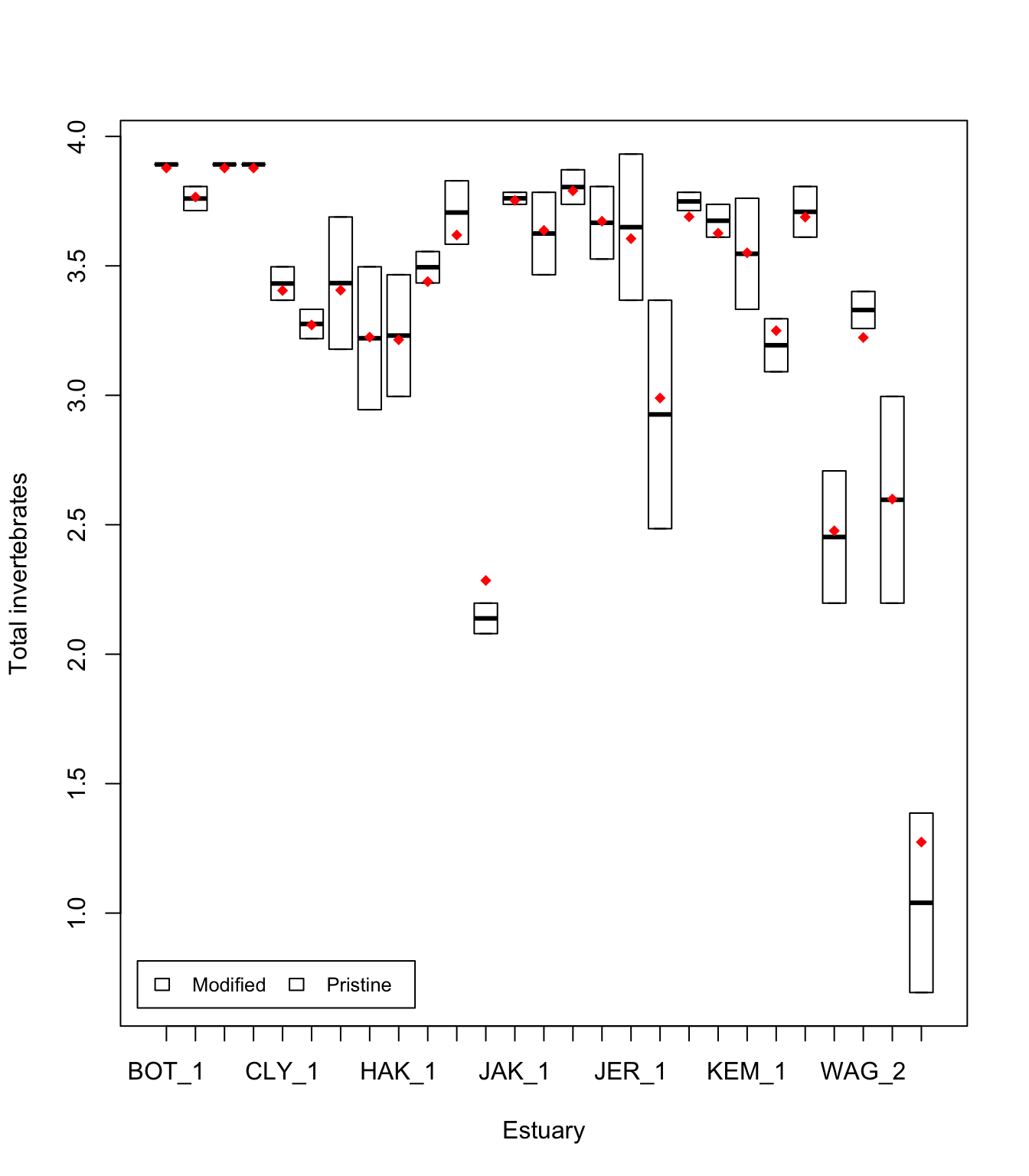
Alternatively, you can plot by Estuary as before (see Mixed models 1).
24.3.1 Further help
You can type ?lmer into R for help with these functions.
Fitting linear mixed-effects models using lme4 (Bates et al. 2015, Journal of Statistical Software), from the authors of lme4.
Faraway, JJ (2005) Extending the linear model with R: generalized linear, mixed effects and nonparametric regression models. CRC Press.
Zuur, A, EN Ieno and GM Smith (2007) Analysing ecological data. Springer Science & Business Media.
Author: Gordana Popovic
Year: 2016
24.4 Generalised Mixed Models
Generalised linear mixed models
You will need to read Mixed models 1 and Mixed models 2 as an introduction to mixed models for continuous data, as well as the help pages on Generalised linear models as an introduction to modelling discrete data.
This section will combine the two to allow you to model discrete data (e.g., presence/absence) with random effects using generalised linear mixed models (GLMMs).
Properties of mixed models
Assumptions. The assumptions of generalised linear mixed models are a combination of the assumptions of GLMs and mixed models.
- The observed \(y\) are independent, conditional on some predictors \(x\)
- The response \(y\) come from a known distribution from the exponential family, with a known mean variance relationship
- There is a straight line relationship between some known function (link) of the mean of \(y\) and the predictors \(x\) and random effects \(z\)
- Random effects \(z\) are independent of \(y\).
- Random effects \(z\) are normally distributed
24.4.1 Running the analysis
24.4.2 Running the analysis
We will analyse the same data set as the first two mixed model tutorials. This data set aimed to test the effect of water pollution on the abundance of some subtidal marine invertebrates by comparing samples from modified and pristine estuaries. In the first two tutorials, we analysed the total count of invertebrates, which we assumed to be continuous as the total counts were large. Here, we will analyse the counts and presence/absences of individual species, which require generalised linear mixed models.
We will use the package lme4 for all our mixed effect modelling. It allows us to model both continuous and discrete data with one or more random effects. There are however some limitations for discrete data.
What lme4 can do
- model binary data (e.g., presence/absence)
- model counts with Poisson distribution
What lme4 can’t do
- model overdispersed counts (unfortunately these are really common in ecology)
- provide good residual plots (we need these for assumption checking)
First, load the package:
Download the sample data set, Estuaries.csv, and load into R.
Estuaries <- read.csv("data/Estuaries.csv", header = T)In this example, we have a fixed effect (Modification; modified vs pristine) and a random effect (Estuary). To test whether there is an effect of modification on individual species counts and presence/absences, we need to use generalised linear mixed models with the glmer function.

Consider the counts of hydroids (the variable Hydroid).
 [1] 0 0 0 0 1 1 0 0 7 5 2 0 0 0 3 3 0 0 0 0 0 0 0 0 0 0 1 1 2 1 2 2 0 0 0 0 0 0
[39] 0 0 0 0 1 0 0 0 0 3 1 0 1 2 2 2
Looking at the data, you can see the counts are small, with many zeros, so we don’t want to treat these as continuous. We will model them as counts with a Poisson distribution, and also as presence/absence data.
To model presence/absence, we first create a variable HydroidPres which is 1 (TRUE) when Hydroids are present and 0 (FALSE) otherwise.
Estuaries$HydroidPres <- Estuaries$Hydroid > 0Binary data
To fit a model for the presence or absence of hydroids, we would use glmer with family=binomial.
fit.bin <- glmer(HydroidPres ~ Modification + (1 | Estuary), family = binomial, data = Estuaries)Checking assumptions As usual, we can examine residual plots to check assumptions.
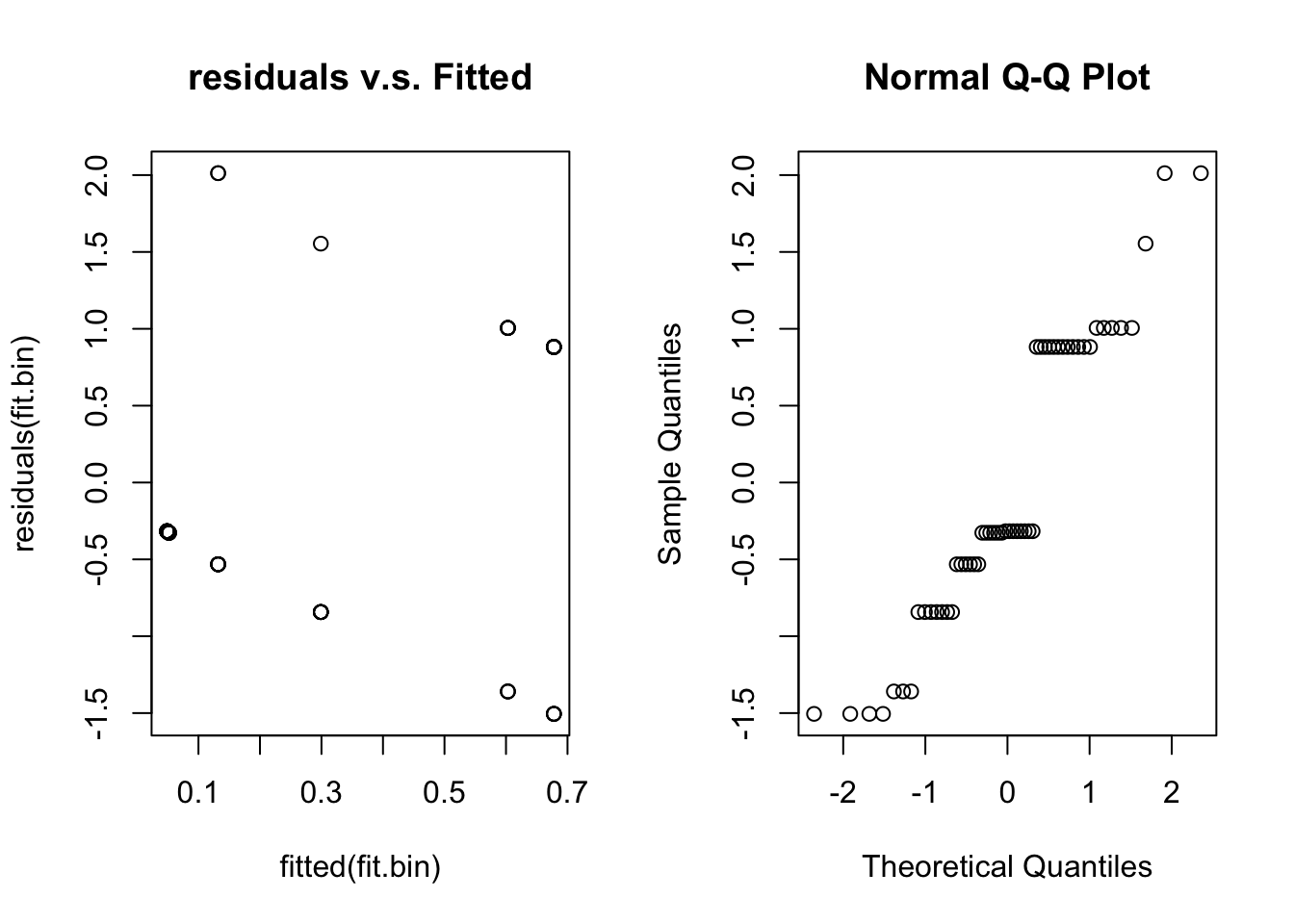
Unfortunately, for binary data residual plots are quite difficult to interpret. In the residual v.s. fitted plot all the 0’s are in a line (lower left) and all the ones are in a line (upper right) due to the discreteness of the data. This stops us from being able to look for patterns. We have the same problem with the normal quantile plot.
Briefly looking at our assumptions, Assumptions 1 and 4 we can’t check, but will be true if we sample randomly. Assumption 2 and 3 we should check with the residual plots, but given its failings we are unsure. Assumption 5 is hard to check in general and not crucial.
Hypothesis test for fixed effects
For generalised linear mixed models (GLMMs), we need to use the parametric bootstrap even for fixed effects inference. This is because the p-values from the anova function are quite approximate for GLMMs even for fixed effects. Sometimes the glmer function will give warnings or errors, so I’ve added a tryCatch to this code to handle that.
nBoot <- 1000
lrStat <- rep(NA, nBoot)
ft.null <- glmer(HydroidPres ~ 1 + (1 | Estuary), family = binomial, data = Estuaries) # null model
ft.alt <- glmer(HydroidPres ~ Modification + (1 | Estuary), family = binomial, data = Estuaries) # alternate model

lrObs <- 2 * logLik(ft.alt) - 2 * logLik(ft.null) # observed test stat

for (iBoot in 1:nBoot)
{
  Estuaries$HydroidPresSim <- unlist(simulate(ft.null)) # resampled data
  tryCatch(
    { # sometimes the glmer code doesn't converge

      bNull <- glmer(HydroidPresSim ~ 1 + (1 | Estuary), family = binomial, data = Estuaries) # null model
      bAlt <- glmer(HydroidPresSim ~ Modification + (1 | Estuary), family = binomial, data = Estuaries) # alternate model
      lrStat[iBoot] <- 2 * logLik(bAlt) - 2 * logLik(bNull) # resampled test stat
    },
    warning = function(war) {
      lrStat[iBoot] <- NA
    },
    error = function(err) {
      lrStat[iBoot] <- NA
    }
  ) # if code doesn't converge skip sim
}
mean(lrStat > lrObs, na.rm = T) # P-value for test of Estuary effect
[1] 0.03092784We have evidence of an effect of modification on the presence of hydroids.
Count data
lme4 can model count data that has a Poisson distribution. If the data do not fit the Poisson mean/variance relationship, then things become much more complicated, and we won’t cover that situation here.
To model the counts of hydroids, we would use use glmer with family=poisson.
fit.pois <- glmer(Hydroid ~ Modification + (1 | Estuary), family = poisson, data = Estuaries)To check the assumptions:
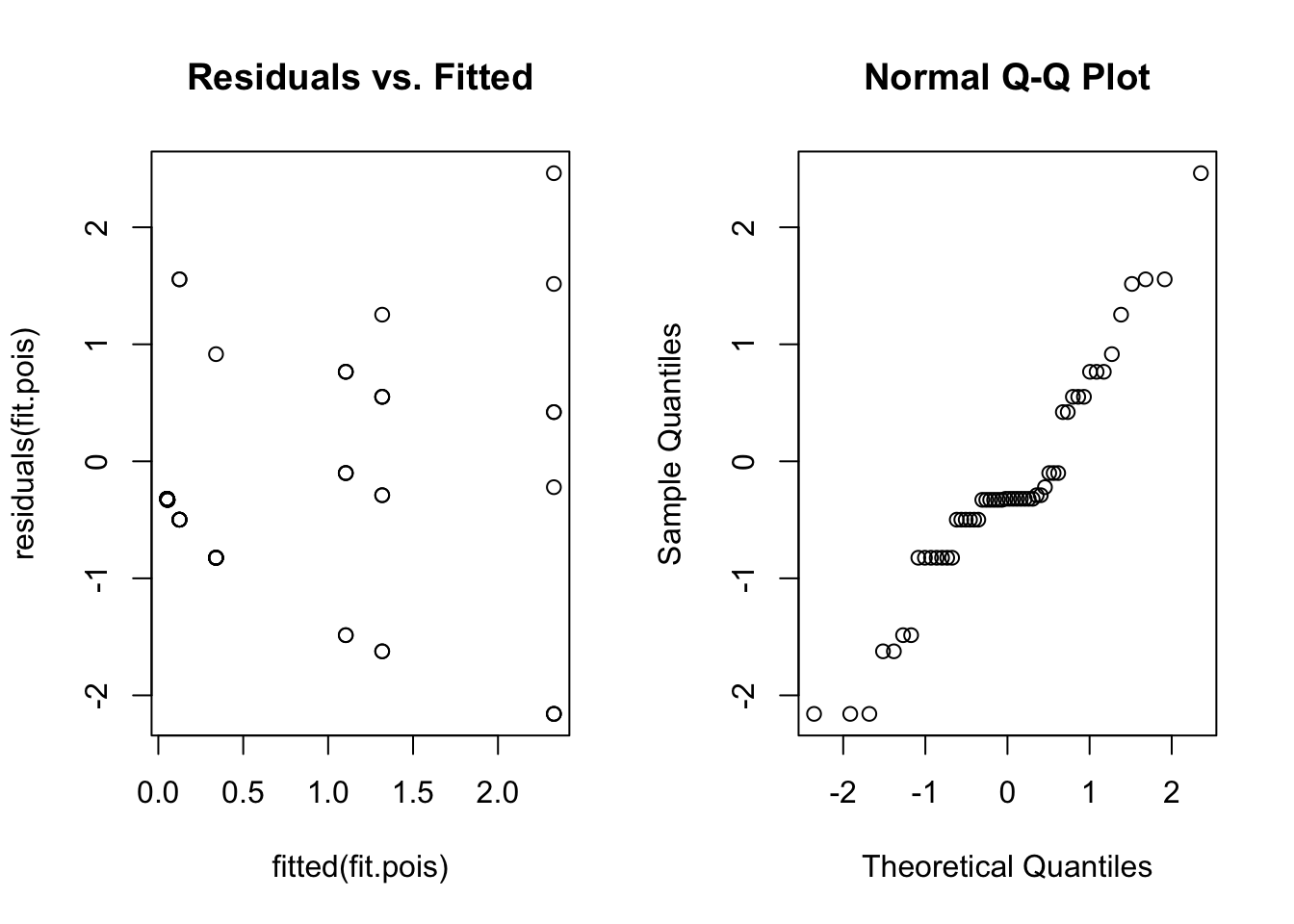
Once again, the residual plots aren’t that useful, but we at least get an idea about whether the variance assumption is reasonable. There is no obvious fan shape, so a Poisson model seems okay.
Hypothesis test for fixed effects
Again, we can use parametric bootstrapping to test for an effect of Modification.
nBoot <- 1000
lrStat <- rep(NA, nBoot)
ft.null <- glmer(Hydroid ~ 1 + (1 | Estuary), family = poisson, data = Estuaries) # null model
ft.alt <- glmer(Hydroid ~ Modification + (1 | Estuary), family = poisson, data = Estuaries) # alternate model

lrObs <- 2 * logLik(ft.alt) - 2 * logLik(ft.null) # observed test stat
for (iBoot in 1:nBoot)
{
  Estuaries$HydroidSim <- unlist(simulate(ft.null)) # resampled data
  tryCatch(
    {
      bNull <- glmer(HydroidSim ~ 1 + (1 | Estuary), family = poisson, data = Estuaries) # null model
      bAlt <- glmer(HydroidSim ~ Modification + (1 | Estuary), family = poisson, data = Estuaries) # alternate model
      lrStat[iBoot] <- 2 * logLik(bAlt) - 2 * logLik(bNull) # resampled test stat
    },
    warning = function(war) {
      lrStat[iBoot] <- NA
    },
    error = function(err) {
      lrStat[iBoot] <- NA
    }
  ) # if code doesn't converge skip sim
}
mean(lrStat > lrObs, na.rm = TRUE) # P-value for test of Estuary effect
[1] 0.04202719We have evidence of an effect of modification on hydroid abundance.
A non Poisson example
Often, count data will not fit a Poisson distribution. Look at what happens if you try and model the counts of the bryozoan, Schizoporella errata, from that same data set.
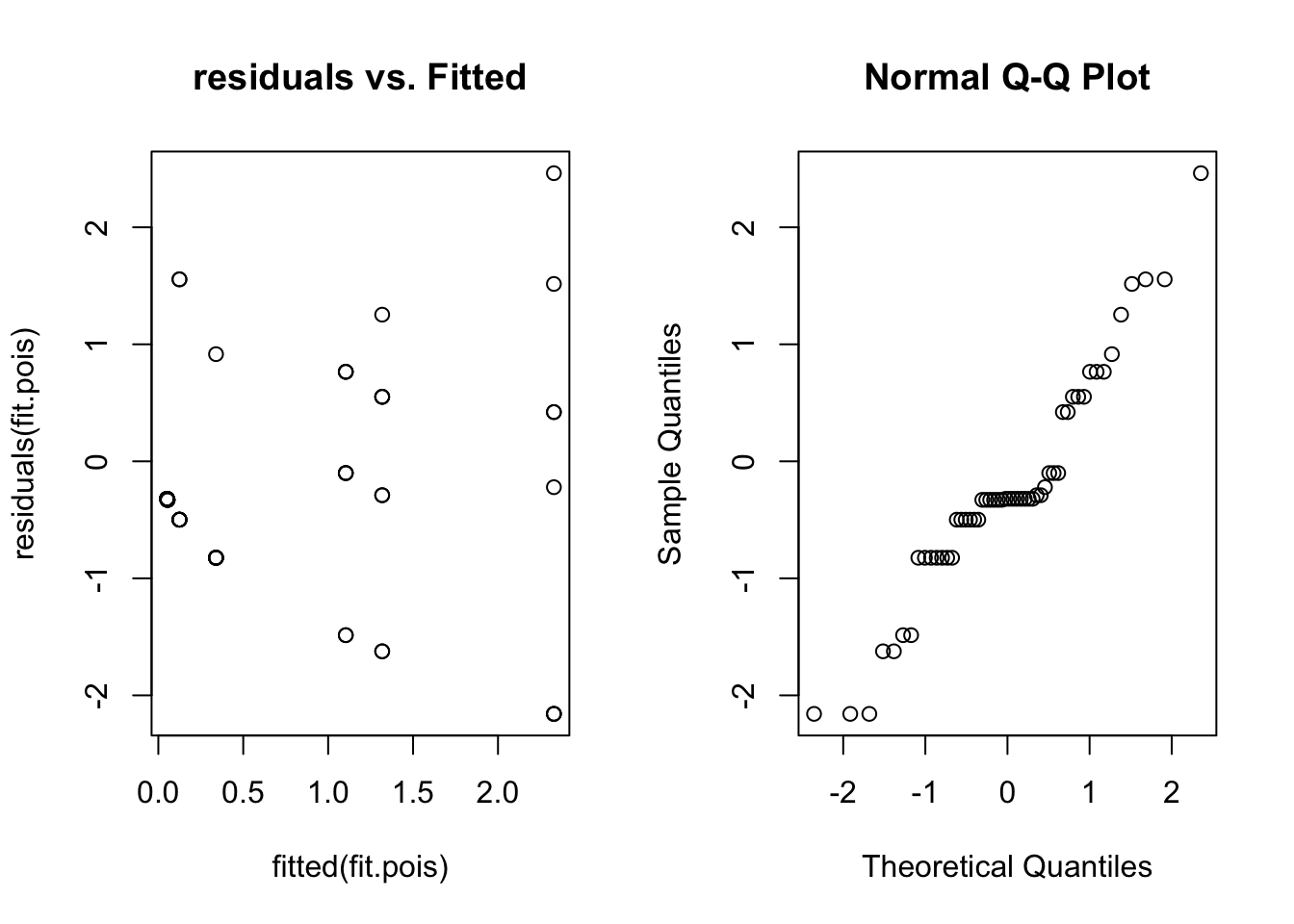
Here we can see a distinct fan shape in the residual vs. fitted plot. Unfortunately lme4 can’t handle this situation (overdispersion), and there is no easy way to model these data. If this happens in your data try the glmmTMB package, which can fit negative binomial and other models for overdispersed data with random effects (it replaces the older glmmADMB package).
Hypothesis test for random effects
As before you could run hypothesis tests on the random effects using a parametric bootstrap. See Mixed models 1 and Mixed models 2 for code that you could modify for this situation.
24.4.3 Communicating results
24.4.4 Communicating results
Written. Results of generalised linear mixed models are communicated in a similar way to results for linear models. In your results section you should mention that you are using mixed models with R package lme4, and list your random and fixed effects. You should also mention how you carried out inference, i.e. likelihood ratio tests (using the anova) or parametric bootstrap. In the results section for one predictor, it suffices to write one line, e.g. “There is strong evidence (p<0.001) of negative effect of modification on total abundance”. For multiple predictors it’s best to display the results in a table.
Visual. The best way to visually communicate results will depend on your question, for a simple mixed model with one random effect, a plot of the raw data with the model means superimposed is one possibility.
library(Hmisc)
fit.pois <- glmer(Hydroid ~ Modification + (1 | Estuary), family = poisson, data = Estuaries)
means <- fitted(fit.pois) # this will give the estimate at each data point
ModEst <- unique(Estuaries[c("Estuary", "Modification")]) # find which Estuaries are modified
cols <- as.numeric(ModEst[order(ModEst[, 1]), 2]) + 3 # Assign colour by modification
boxplot(Hydroid ~ Estuary, data = Estuaries, col = cols, xlab = "Estuary", ylab = "Count of hydroids")
legend("topleft",
  inset = .02,
  c("Modified", "Pristine"), fill = unique(cols), horiz = TRUE, cex = 0.8
)

Est.means <- summarize(means, Estuaries$Estuary, mean)$means # extract means by Estuary
stripchart(Est.means ~ sort(unique(Estuary)), data = Estuaries, pch = 18, col = "red", vertical = TRUE, add = TRUE) # plot means by estuary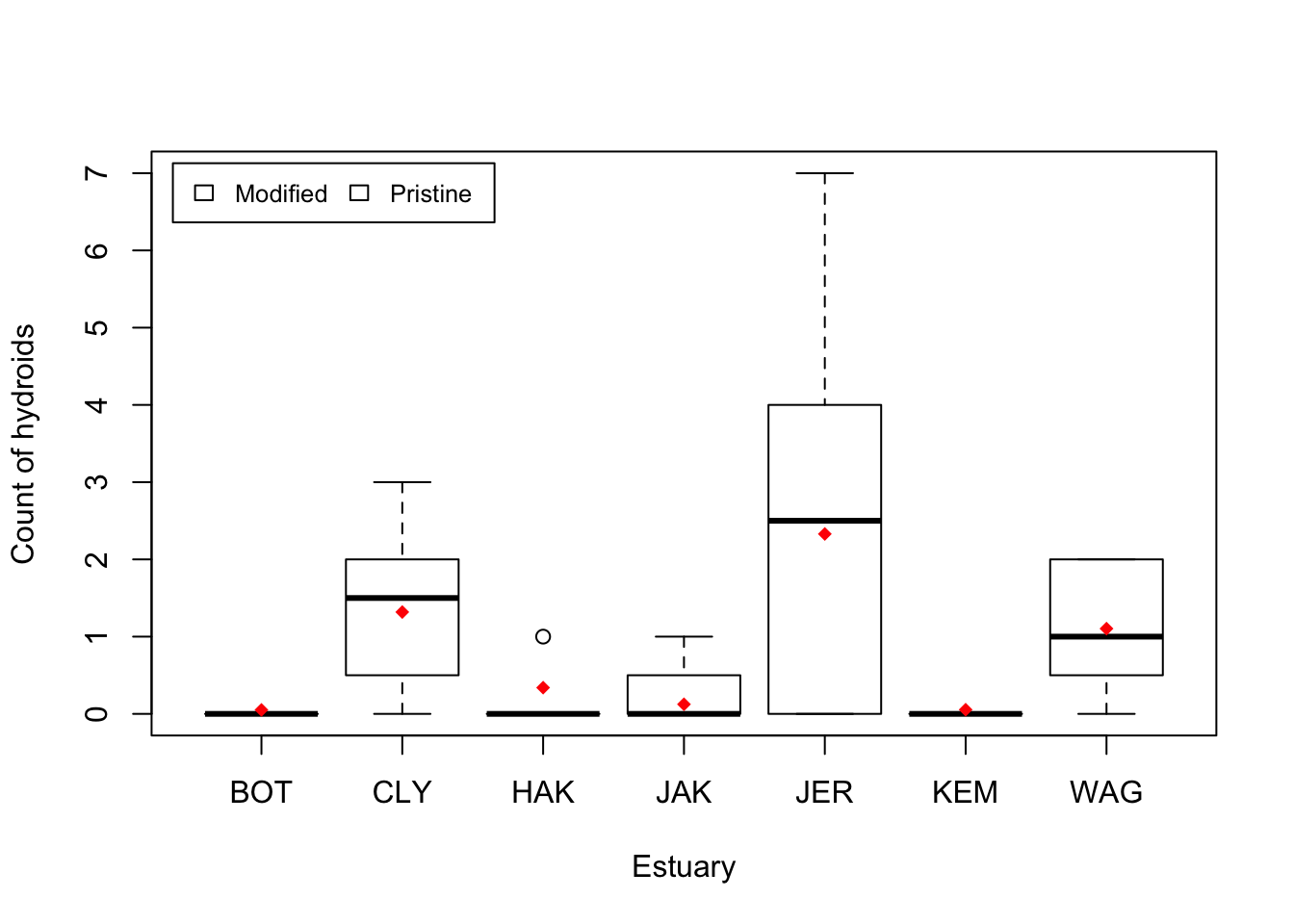
24.4.5 Further help
You can type ?glmer into R for help with this function.
Fitting linear mixed-effects models using lme4 (Bates et al. 2015, Journal of Statistical Software), from the authors of lme4.
Faraway, JJ (2005) Extending the linear model with R: generalized linear, mixed effects and nonparametric regression models. CRC Press.
Zuur, A, EN Ieno and GM Smith (2007) Analysing ecological data. Springer Science & Business Media.
Author: Gordana Popovic
Year: 2016